Extract fields.
Know what to review.
Schema-shaped JSON — source coordinates on every value, and a review list when something doesn't check out.
No templates. No training. No silent wrong numbers.
The whole integration is one POST
Name your fields, and where you already know the shape a value must have, say that too. Typed JSON comes back with coordinates and flags on every value, and this exact call runs as-is.
curl -X POST https://api.space-ocr.com/ocr/fields \
  -H "Authorization: Bearer YOUR_API_KEY" \
  -H "Content-Type: application/json" \
  -d '{
    "image": "https://example.com/receipt.jpg",
    "imageType": "url",
    "fields": [
      { "name": "store_name" },
      { "name": "invoice_no", "pattern": "^[0-9]{6}$" },
      { "name": "total", "type": "number", "required": true }
    ]
}'{
"status": "success",
"data": {
"values": {
"store_name": "Supermarket ABC",
"invoice_no": "10O482",
"total": "$4.94"
},
"cells": {
"invoice_no": {
"box": { "xmin": 612, "ymin": 96,
"xmax": 742, "ymax": 118 },
"quad": [ /* 4 corners */ ],
"verified": false,
"review": { "reasons": ["pattern_mismatch"] },
"evidence": { "text_match": true }
}
// …store_name, total — same shape
},
"review": {
"unit": "field", "declared": 3,
"returned": 3, "boxed": 3, "verified": 3,
"flagged": [
{ "path": "invoice_no",
"reasons": ["pattern_mismatch"] }
],
"by_reason": { "pattern_mismatch": 1 }
},
"normalized": { "invoice_no": "10O482", "total": 4.94 },
"image": { "width": 1654, "height": 2339 }
}
}Any field you name
No training, no processor setup, no document-type registration.
Same answer next run
Same pages, three runs — 16 of 463 values moved.
Wrong values raise their hand
Every value carries coordinates and a flag — review the flags, not every field.
What that one call turns into
Demos other developers built on the same endpoints.
values and cells come back separately, so the value and its evidence land in the same UI.
Invoice review ledger
Draws the returned coordinates over the photo, so a person checks each value against the image and fixes what is wrong. Once the flagged items are cleared it runs the arithmetic checks, warns on duplicates, and saves to SQLite with a CSV export.
normalized comes back shaped like values, so display as printed, compute as numbers fell straight out.
Invoices to accounting journal entries
Turns a photographed invoice into a journal-entry CSV that Yayoi imports as is. It splits the entries by tax rate, works out whether the totals are tax-inclusive, and writes the items that need a person's eye into a separate file.
Line-item reading is the strong suit — table rows never slipped, and photographed paper read the same as direct-PDF output.
Construction cost ledger
Reads paper purchase orders, delivery notes and invoices, then runs qty × unit-price and line-total checks, matches against project and vendor masters, and catches duplicate entries. Only the items that fail get framed on the original document, and nothing posts to the per-project ledger without a person's confirmation.
Because every value comes back with coordinates, we could rebuild the reading order from the page layout and verify, in our own code, where each value came from on the image.
Screen-reader form reader
A web app that rebuilds an invoice or a health-check sheet into an order a screen reader can read from top to bottom and still make sense. On a two-column form, reading the values in returned order mixes the left and right tables into one spoken line, so the reading order is rebuilt from the coordinates in cells — and a frame moves across the original image as each value is spoken. Its author is a blind software engineer, and every ordering check was done by actually listening to it.
音声合成:Open JTalk(Modified BSD)/HTS voice "tohoku-f01"(東北大学 Intelligent Communication Network Laboratory、Creative Commons Attribution 4.0)
Without quad this UI would not have worked — even on a tilted photo, the outline lands exactly on the characters.
Folder-to-CSV desktop app
Pick a folder of document photos and PDFs, batch-read every page, and export a CSV — a single Windows exe, no Python install. Only cells that need review are colored, with the source spot outlined by quad on the original; the screen shows values as printed while the CSV gets the normalized values. The only network traffic is the API call — nothing is stored outside the PC.
The characters were read correctly, but the value doesn't fit the declared type — getting that distinction inside a single cell is what made the review screen work.
Delivery-note check-and-match pipeline
Takes one photo of a printed delivery note through extraction → arithmetic checks → a match against purchase-order data → Google Sheets registration, on Cloudflare Workers. Only rows that clear the quantity-×-unit-price check and the PO master match are registered automatically; the rest are set aside with the reason attached. The verdict per line (register / review / out of scope) is drawn over the original photo as three colors of outlines.
The hard part starts after OCR reads the text.
The layer between a photo and the fields your database expects is already built.
- 01
“Where did this number come from?”
Each value carries
box/quadcoordinates pointing into the source image. - 02
“The same ¥711 sits on four lines — why this one?”
Values are matched against the OCR text character by character before a box is chosen.
- 03
“Slips arrive rotated 90 degrees.”
Rotation and skew are read from the photo as it was taken.
- 04
“The one that passes while wrong is what worries me.”
Every value is cross-checked against the OCR pass — uncertain ones land on
review.flagged. - 05
Async + signed webhooks
/jobspolling · HMAC webhooks · OpenAPI 3.1. - 06
No database to stand up
Create a folder and a sheet, rows pile up, and
/viewpulls them back with filters.
The model never decides where a value is.
The five steps the pipeline runs on every call.
- 01
Read the page with OCR
OCR finds every character and where it sits — the only step that produces coordinates.
- 02
The model extracts the values
It reads the image and that text together, and pulls out the fields you asked for or the document's own structure. It never invents coordinates.
- 03
Anchor every value
Each value the model returns is anchored to the exact spot on the page where OCR read it.
- 04
Cross-check the two
Where they disagree, that spot is cropped and read once more — whatever still fails comes back flagged, with the reason attached.
- 05
Return values with evidence
Each value comes back with the
boxandquadit was read from.
Measured side by side, on the same photos
Same images, same field schema, same grading script, three runs per engine. The raw responses and the grading code are public.
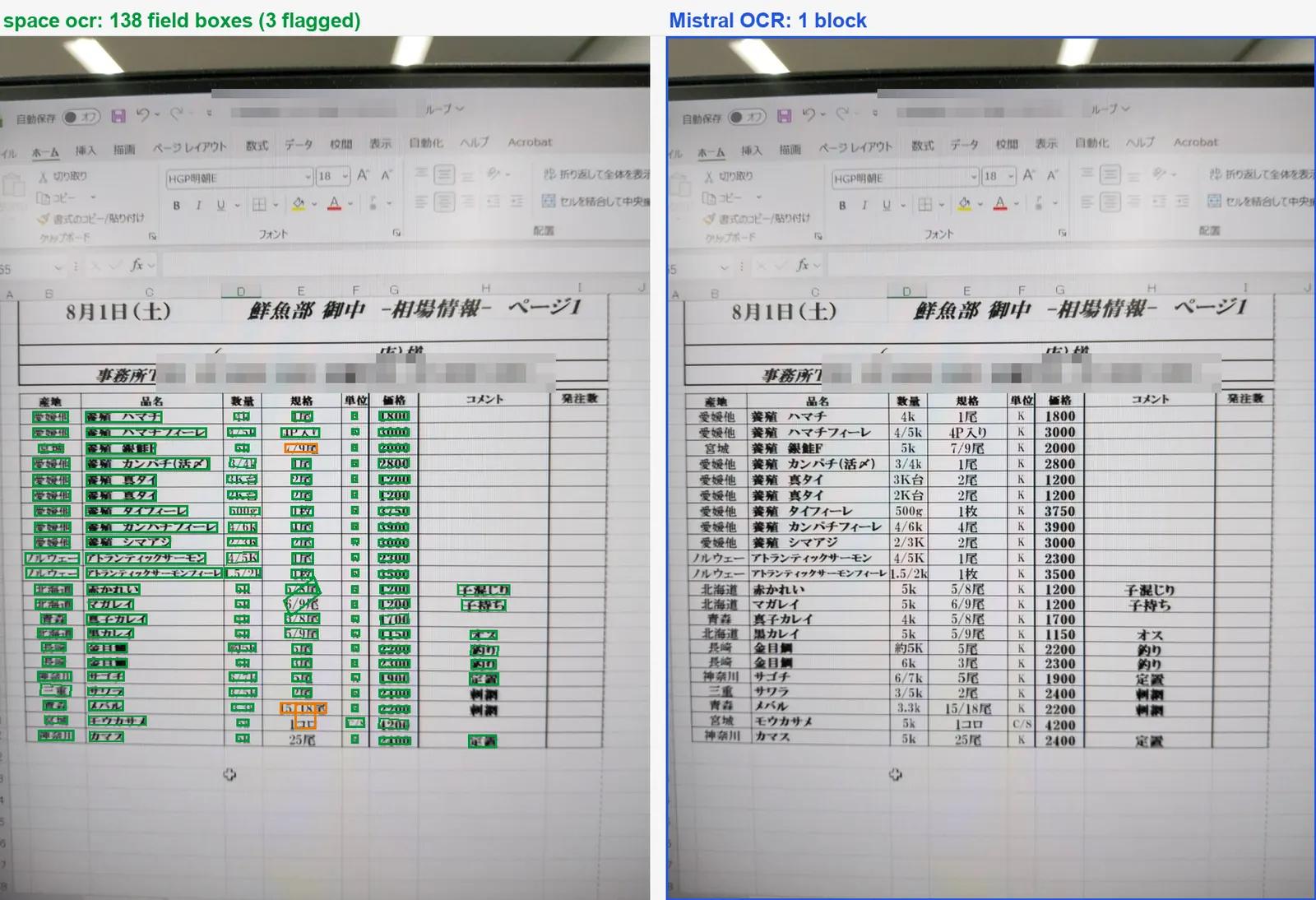
8 cases over 7 documents · 463 fields · 3 runs each · August 2026 — measured against Mistral Document AI.
Verification you can see and touch
The same checked values the API returns, in a screen built to read them: point at a value and the photo answers.
- 01Drop the photos in
No setup, no code. Drag a stack of photos into the browser and the rows fill themselves.
- 02Point at a value, the photo answers
Hover a cell and the exact region of the original lights up — and it works the other way too, from the photo back to the value.
- 03Doubt is visible, not hidden
Values that failed the cross-check stand out in colour instead of sitting quietly wrong, so you only review what deserves it.
- 04Fix it where you found it
Correct a value with the original right beside it. No second window, no hunting for the page it came from.
- 05Take it with you
Export a sheet as CSV that opens cleanly in Excel, or a doc bundle as .md / .txt.
Three formats, and a place to keep them
Pick a format when you upload. What it reads stacks up in a folder, and you can query and search it from there.
Structured fields
Name the fields you want and get them typed, with line items unfolded. Rows stack into a sheet you can query and export as CSV.
Markdown
Headings, paragraphs, lists and tables keep their structure — ready to drop into a doc site, a wiki, or an LLM context window.
Plain text
The raw reading, paragraph by paragraph. The plainest way to index, search or diff a scan.
Folders
Results stay in a folder you named. Folders nest, and sheets, document bundles and memos all live in them.
Query
Pull the stacked rows back with filters. where · sort · select and pagination run on the server.
Search
Walk the tree, or type once and everything matches: folder and file names, memo bodies, and the cell values read off the page.
Let an agent file it and fetch it
Connect one MCP server. Hand it photos and it creates the folders and sheets they call for, stacking each photo as a row, then pulls back only the rows you ask about later. The results stay there, so there is no database to stand up.
- space_createCreate folders and sheets
- space_uploadUpload photos as rows
- space_viewQuery with filters
- space_deleteDelete, after confirming
Anywhere that speaks MCP
Frequently asked questions
You can start with a conversation.
You don't need to be a developer. If you're interested in automating your paperwork, we'll review the fit together, including a trial with your real data.